 Acreonix
A property management spreadsheet is a workbook that tracks properties, landlords, tenants, leases and rent in rows and tabs. It works well for a small portfolio, but once several people edit it, or rent, renewals and maintenance need reminders, it becomes slow and error-prone. Moving to property management software is mostly a data job: clean the spreadsheet, import records in the right order, run both systems side by side for a short period, then switch over.
This guide covers when spreadsheets stop working, what to move and in what order, how to clean your data first, and how to get your team to actually use the new system.
When does a property management spreadsheet stop working?
Spreadsheets are flexible, cheap and familiar. Many good agencies run on them for years. The trouble starts when the workbook becomes the only record of things that need action, not just information.
Common signs you have outgrown it:
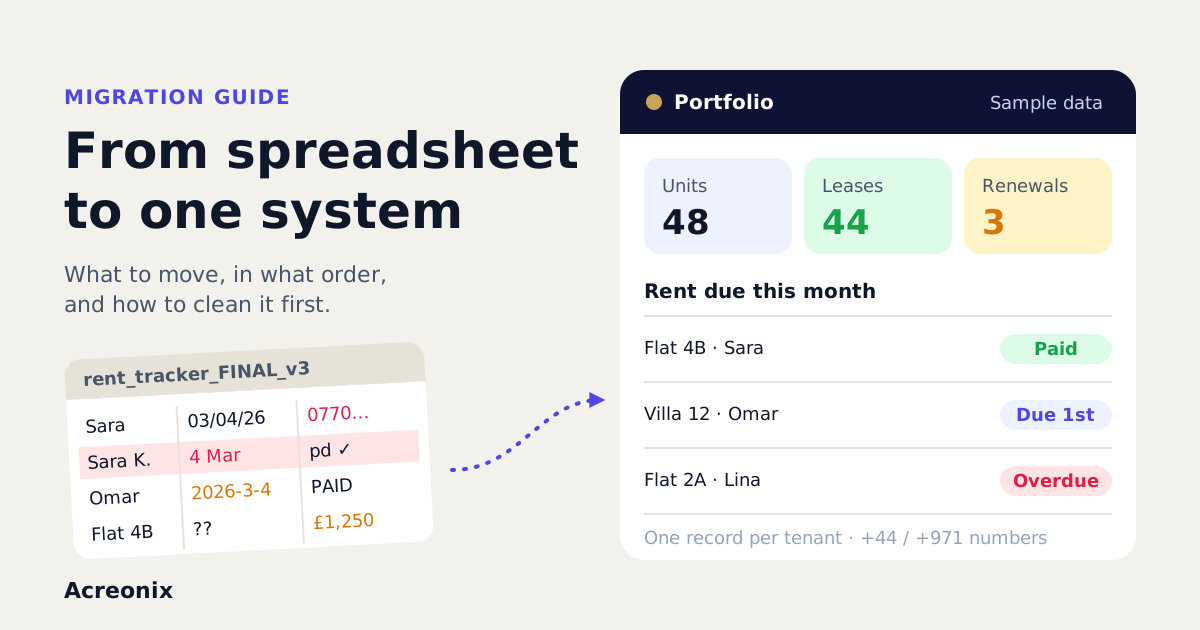
- Several versions exist. "Rent tracker FINAL v3" lives on one laptop, a newer copy in someone's email.
- Nobody trusts the arrears figure without checking the bank statement line by line.
- Renewals and certificate expiries are missed because nobody happened to scroll to the right row.
- One person holds the logic. The formulas, colour codes and hidden tabs only make sense to whoever built them.
- Landlord statements take a day to copy, paste and check at month end.
- Leads and tenants live in different places, so the same person is typed in twice with two phone numbers.
- You cannot see who changed what. A deleted row or overwritten payment has no history.
If three or more of these sound familiar, the spreadsheet is costing you more time than it saves.
What should you move first?
The order matters because most records depend on others. A lease needs a tenant and a unit. A rent schedule needs a lease. Import in dependency order and each step has something to attach to.
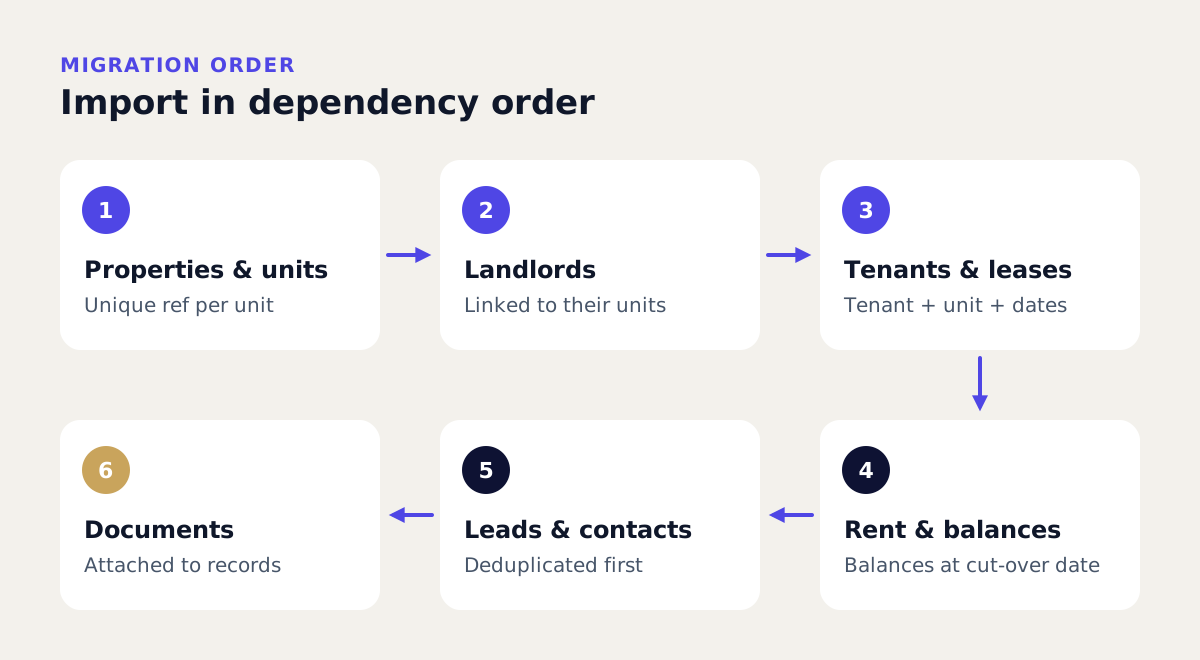
- Properties and units. The building blocks. Give every unit a unique reference (for example "Flat 4B, Riverside House" or "Villa 12, Arabian Ranches").
- Landlords. Link each landlord to the units they own, with bank and contact details checked.
- Tenants and leases. Create tenants, then leases linking tenant, unit, start and end dates, rent amount and frequency.
- Rent schedules and opening balances. Generate future rent from each lease and enter one opening balance per tenancy as at your cut-over date.
- Leads and contacts. Applicants, buyers, prospective landlords and suppliers. These are often the messiest, so they come after the core.
- Documents. Signed leases, ID, certificates and inventories, attached to the right record once that record exists.
A useful rule: do not migrate history you will never use. Bring in live tenancies and current balances in full. For old tenancies and years of past payments, keep a read-only archive of the spreadsheet rather than importing everything.
How do you clean spreadsheet data before importing it?
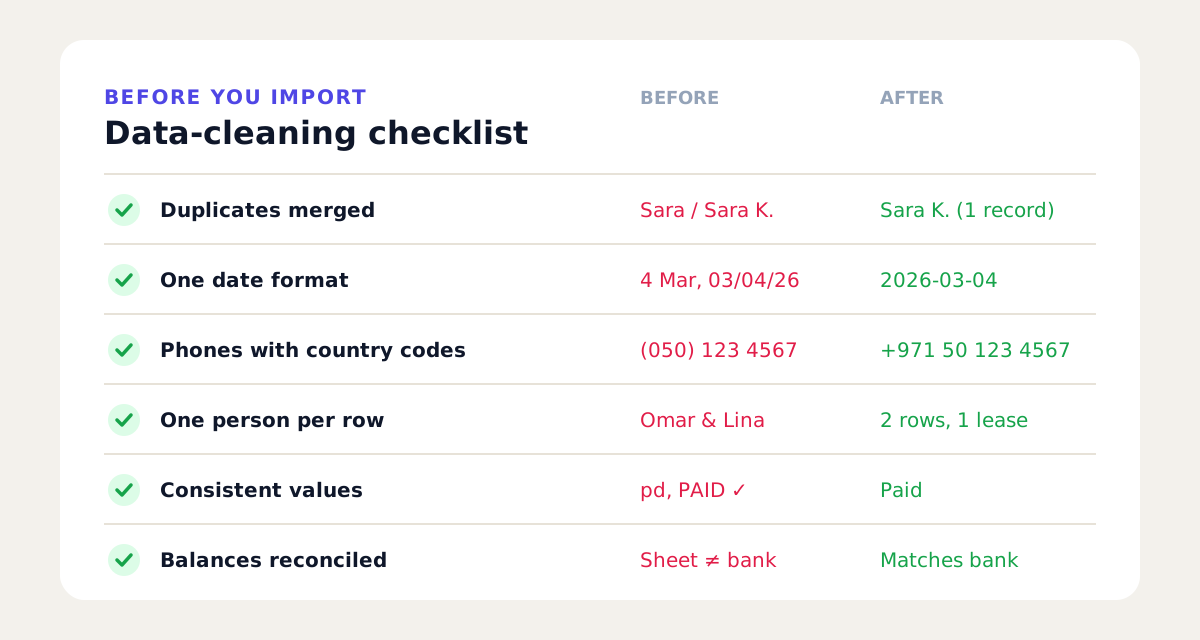
Most migration problems are data problems. An hour spent cleaning saves days of fixing records after import. Work on a copy, never the live file.
| Check | What to look for | How to fix it |
|---|---|---|
| Duplicates | The same tenant or landlord typed twice, with small spelling differences | Sort by email and phone, merge into one row, keep the most recent details |
| Dates | A mix of 03/04/2026, 4 March 2026 and 2026-03-04 | Pick one format (ISO, YYYY-MM-DD, is safest) and convert every date column |
| Phone numbers | Local numbers with no country code, spaces and brackets | Store in international format, such as +44 7700 900123 or +971 50 123 4567 |
| One record per row | Two tenants in one cell, notes in the amount column | Split joint tenants into separate rows linked to one lease; move notes to a notes column |
| Consistent values | "Paid", "pd", "PAID ✓" in a status column | Agree a short list of allowed values and replace the rest |
| Amounts | Currency symbols and text inside number cells | Keep numbers as plain numbers and put the currency in its own column |
| Missing keys | Units with no reference, leases with no end date | Fill gaps or flag them for a decision before import |
| Totals | Opening balances that do not match the bank | Reconcile each tenancy balance to the cut-over date before you import it |
Phone numbers deserve extra care if you plan to use WhatsApp or SMS from the new system. A number saved as "07700 900123" may not be recognised as a UK mobile without its +44 prefix, and a UAE number missing +971 has the same problem.
A step-by-step migration plan
Most agencies can follow the same broad plan. The time each step takes depends on your data, not on the software.
- Pick a cut-over date. The start of a rent month is usually easiest, because opening balances line up with a clean period.
- Map your columns. List every spreadsheet column and the field it becomes in the new system. Decide what to drop.
- Clean a copy using the checklist above.
- Run a test import with a small sample, say ten units with their landlords, tenants and leases. Check every field on screen.
- Fix the template and repeat until the sample imports cleanly.
- Import the full data set in the order above: units, landlords, tenants and leases, rent schedules and balances, leads, then documents.
- Reconcile. Compare unit counts, tenant counts and total arrears between the spreadsheet and the system. They should match.
- Run in parallel for one rent cycle (see below).
- Switch off the spreadsheet. Make it read-only, store it as an archive and tell the team the system is now the record.
Should you run both systems in parallel?
Yes, but briefly. A parallel run means recording rent received and key events in both places for a short period, typically one rent cycle, and comparing the results. If arrears, payments received and upcoming renewals match, you can trust the new system.
Keep it short. Running two systems for months doubles the work and people quietly drift back to the spreadsheet. Set an end date at the start and stick to it. If something does not match, fix the cause in the new system rather than extending the parallel run.
How do you get the team to use the new system?
Software only helps if everyone uses it. A few habits make adoption much easier:
- Name an owner. One person answers "where does this go?" questions for the first month.
- Train on real tasks, not menus. "Record a payment", "log a repair", "renew a lease".
- Start with the work people dislike most, such as chasing arrears or building landlord statements. Early wins matter.
- Remove the alternative. Once the parallel run ends, lock the spreadsheet. Two sources of truth means none.
- Use mobile where it helps. Inspections and viewings are easier to record on a phone at the property than at a desk later.
- Review after 30 days. Ask what is still done outside the system and why.
What should you keep in spreadsheets?
Spreadsheets are still excellent for analysis. The point of moving is to stop using them as the system of record, not to ban them.
| Keep in the system | Fine in a spreadsheet |
|---|---|
| Live tenants, leases and landlords | One-off analysis of rent levels or yields |
| Rent schedules, payments and arrears | Budget models and forecasts |
| Maintenance tickets and contractors | Exports for your accountant |
| Documents, renewals and reminders | Board or partner reports built from exports |
| Leads, viewings and follow-ups | Read-only archive of old history |
The healthy pattern is one way: data lives in the system, and you export to a spreadsheet when you want to analyse it.
How do you choose software that makes import and export easy?
Before you sign up, ask each vendor:
- Can I import from CSV or Excel myself, and are there templates for units, tenants, leases and leads?
- Will you help with the migration, and is that included or charged separately?
- What happens to duplicates during import? Are they flagged or silently created?
- Can I export everything, including transactions and notes, in a standard format such as CSV?
- What do I get if I leave? Check the export format and timeline in the terms.
- Can I trial it with my own data rather than a demo account full of sample records?
Easy exit is as important as easy entry. A system you cannot export from is just a more expensive spreadsheet. For a wider checklist, see our guide to property management software for UK letting agents or what property management software is.
Moving to Acreonix
Acreonix is one option built for this move. Its property management software covers properties, landlords, tenants, leases with e-signature, rent schedules and reconciliation, maintenance, move-in and move-out inventories, and landlord statements, and the real estate CRM holds leads with import and export. Data migration from spreadsheets, PropSpace, Masterkey or Bitrix is included in the guided pilot, and you can request a full JSON and CSV export of your data if you leave. The comparison with spreadsheets and legacy software shows how it differs.
There is a free-forever plan for 3 units and 25 leads with no card needed, so you can start free and test a small import yourself, or book a demo and bring your spreadsheet.
Frequently asked questions
Is a spreadsheet good enough for property management?
For a few units managed by one person, often yes. It becomes risky when several people edit it, when you need reminders for rent, renewals and certificates, or when you need a history of who changed what. At that point dedicated software usually saves time.
How long does it take to move from Excel to property management software?
It depends mostly on how clean your data is. A small, tidy portfolio can be imported in a day or two, while a large or messy workbook may need a week or more of cleaning first. Allow one rent cycle for a parallel run on top.
What data should I migrate first?
Start with properties and units, then landlords, then tenants and leases, then rent schedules and opening balances. Leads, contacts and documents come last because they depend on the core records already existing.
Should I import all my historical rent payments?
Usually not. Import live tenancies and an opening balance for each as at your cut-over date. Keep the old spreadsheet as a read-only archive for historical questions and audits.
How do I format phone numbers for import?
Use international format with the country code, for example +44 for UK numbers and +971 for UAE numbers, and remove brackets and extra characters. This helps the system recognise duplicates and makes calling or messaging from the system reliable.
Can I still use Excel after switching?
Yes. Export data from the system for analysis, forecasting or your accountant. Just do not edit the spreadsheet as if it were the live record, or you will end up with two versions of the truth.
Key takeaways
- A property management spreadsheet stops working when several people rely on it for actions such as rent chasing, renewals and statements.
- Import in dependency order: units, landlords, tenants and leases, rent schedules and balances, leads, then documents.
- Clean a copy first: remove duplicates, standardise dates and add country codes to phone numbers.
- Test with a small sample, reconcile totals, then run both systems in parallel for one rent cycle only.
- Keep spreadsheets for analysis and exports, not as the system of record.
- Choose software with self-serve import, migration help and a full export when you leave.